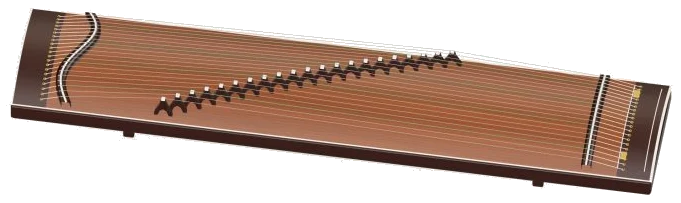
You can pluck the guzheng’s 21 strings virtually online. You can pluck all 21 strings of a guzheng straight from your browser, thanks to this online virtual guzheng.
It’s a 3D model of the guzheng seen from above. It shows the soundboard, each string, and even the diagonal row of moveable bridges.
How to Use the Online Guzheng
You can just click or touch the string directly to play it. You don’t have to sign up or install anything; just play using your computer keyboard, your fingers on a phone or tablet, or even a mouse. Every note are not made using a synthesizer but real guzheng recordings, and you can zoom in and rotate it too.
There is no single sound button. When you play for the first time, the sound comes on automatically, with a message of Preparing sounds… and then Sound ready on the status line beneath. A question mark at the top takes you to sound credits and help. The full screen button fills the screen with the guzheng. Press Esc or click Exit full screen to return to normal size. The Volume slider appear in the bottom bar.
The guzheng use a D pentatonic scale, meaning the strings only play the notes D, E, F♯, A, and B, repeated from the lowest string (D2) to the highest (D6). This means that each string is part of the same five-note scale making it simple to explore.
To play simply drag your finger along the 3D model and pluck the strings. Tap or click on one of the strings and it will ring out and then fade away as if it had been plucked. Sweep a slide from string to string by dragging over a few strings.
There are also four strings drawn in green. These are the F♯ strings making it easier to locate where you are along the row. If you touch the body instead of a string, it will play the note that is currently selected.
There are 21 note pads under the stage (one per string) from D2, D6. You can tap on a pad to play that string or drag your finger over the pads to run up and down the scale. In the corner of the stage it will show you the note you have just played. Each of these pads displays which key is played on a computer keyboard. The keys go from A to V, starting with A, W, S, E, D, F, T, G, Y, H, U, J and K with the semicolon and O, L, P, then Z, X, C and V for the top D6. Then there’s the Space bar that plucks whichever string you’ve chosen. Click within the guzheng itself first before playing from the keyboard.
The whole instrument appear in its frame on the page. Above the pads are four chord buttons: D; D5; Bm and A sus. Press one and you get a quick spread chord played by the guzheng on those notes.
There are also two buttons that sweep across all 21 strings. The Sweep ↓ button plays up from the lowest string to the highest, and the ↑ button sweeps back down from the top. This is the quickest way to hear the full sound of the instrument.
Auto arp button engages a hands-free pattern of one note per beat at your set tempo. It rolls through the notes of whichever chord you previously selected, and tapping a new chord button will switch patterns instantly without a gap. Tapping a pad by itself makes Auto arp repeat that note. Tap the button once more to disengage.
The Bend slider raises the pitch of the sounding notes by up to two semitones, like pressing a string on the left side of the bridge. Then you can pluck the string, drag the slider whilst the note continues to ring, and release to spring back into tune. The Touch slider adjust the hardness of your plucking: from soft and mellow through to loud and bright.
Selecting a song from the menu above the controls will teach you that tune. There are three songs in the online virtual guzheng: Water Garden, Rising & Falling, and Quiet Evening. Hit ▶ Play song to play them, then hit again to stop/pause/continue. The Tempo slider operates between 50 and 150 while a song plays. The ↻ button loops the song, and the ■ button mutes everything. Below the menu, there’s a preview of the upcoming notes and the number of beats they last for.
Click ◇ Game for a guided lesson. You’ll see your turn change to the label. The next note you should play glows amber, and the note you need glows green in the pad. Correct notes move you on (including repeats) and the counter indicates your progress. Miss? The guide line shows you which green note to try. Complete! When you finish, you can either play again or choose another song.
Click 3D and rotate to look around the instrument. Scroll to zoom in/out; drag the background to turn it (or use two fingers on a touchscreen). While Rotate is on, the strings continues to play. To reset the view, click ↺.
For beginners on the guzheng, hit Sweep ↓ a couple of times, then drag your finger across the 3D strings yourself. Then try playing Water garden in Game mode slowly. Once you’re comfortable with that, enable Auto arp and press the chord buttons as it plays.
You should of used it more.