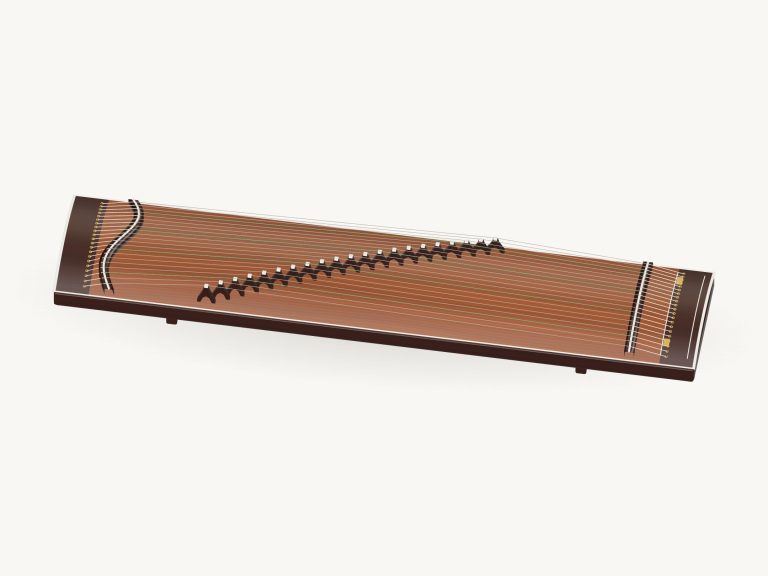
Play this 13-string koto online… Virtualy that is. It’s a koto that lets you play a 13-string instrument directly in your browser. The model is shown from above with thirteen strings over movable bridges. You can zoom in closer and even rotate around to get a better look at the moddern model. Each of the strings on the model can be plucked and the sound is generated from recorded samples rather than a synthesizer.
There is no need to sign up or install anything; just use your computer keyboard, your fingers on a tablet or phone, or a mouse. There is no need to press a sound button before playing. The sound turns on when you play the string for the first time. The message “Preparing sounds…” appears, followed by “Sound ready” on the status line at the bottom of the screen.
How to Play the Online Koto
The Full screen button takes up the entire screen (the koto), while the question mark opens the sound credits and help at the top. Press Esc or click Exit full screen to revert to normal size. The Volume slider appears in the bottom bar.
The tuning of this koto is called D hirajōshi. The strings is played from bottom to top as follows: D3; G3; A3; B♭3; D4; E♭4; G4; A4; B♭4; D5; E♭5; G5; A5. Since each string is tuned to the scale, you can pluck them freely and the notes will always go together.
On the 3D model, which seems the most natural place to play, click or tap a string. It rings out and then fades naturaly as the string shimmers. As the help text says, drag your finger across multiple strings to create a glissando. Touching the body of the koto rather than a string will cause the koto to sound the currently selected note.
There are 13 note pads, each labelled with its note name below the stage. One for every string. Tap on a pad to pluck the string, or drag across them to run up and down. In the corner of the stage it shows the note you’ve just played. The pads are labelled with their keys on a computer keyboard. The thirteen strings are arranged in sequence across the keys A W S E D F T G Y H U J K, from the lowest D3 on A to the highest A5 on K. Pressing the Space bar re-plays the chosen string. Click inside the frame containing the koto first before playing from the keyboard.
When you press the four chord buttons they play a spread chord straight away; D5, G5, B♭ and E♭. Then if you press either of the Sweep buttons, the Sweep ↓ will sound all 13 strings from low to high and the Sweep ↑ will sweep back down from the top. This is a speedy option for hearing the entire tuning at once.
Auto arp is a hands-free pattern that will play one note per beat at the current tempo. It will roll through the notes of the last chord you selected. If you click on a different chord button, it will switch to that pattern and keep going. Tap any single pad and Auto arp will repeat just that note. Click again to stop.
With the Bend slider you can increase the pitch of the sound by as much as two semitones. “Pitch bend,” explains the app, “is like when your left hand pushes on a string past the bridge.” Pull down on the slider, then release to allow it to bounce back. How hard you pull on the string determines the sound quality (Touch slider), ranging from bright and loud to mellow and soft.
In the controls above, select a song from the menu on the left then play the song by clicking ▶. To stop/pause/resume, click again. Use the Tempo slider (50-150) while a song is playing. Tap the ↻ button to loop the song; tap the ■ button to stop everything. Underneath the menu you see the upcoming notes and their number of beats.
Click on ◇ Game when you are ready to play. It changes to your turn when the next note glows amber and the note you need to play glows green on the pad. You move on each time you play the right note (including repeats) and a count up indicates how far along you are. If you do not get the note you hear correctly then you will be told which green note to play by the guide line. When you have finished you will see Complete! You can either play again or pick another song.
Click 3D · Rotate to explore the instrument. On a touchscreen, use two fingers to rotate by dragging left, right, up, or down. Use two fingers to zoom by pinching in or out. Scroll to change the view of the koto. While Rotate is on, the strings continue to sound and you can reset the view using the ↺ button.
Beginners should of press Sweep ↓ a couple of times first, then drag on the 3D strings themselves. Then open Sakura · opening in Game mode with the tempo set slowly and play along following the green pads note-by-note.