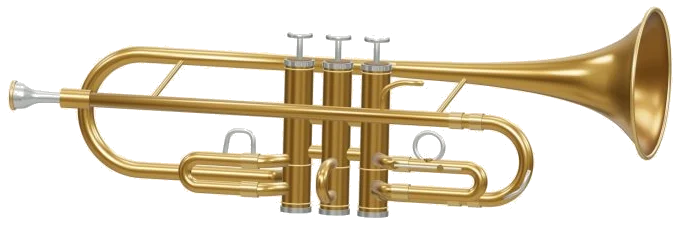
Play a virtual trumpet online. It’s an online virtual trumpet that you can play in the browser. It’s a B♭ trumpet with three piston valves.
It uses real recorded trumpet samples with sustain loops and a smooth release. Nothing to download or sign up for; you can play the trumpet on screen with your computer keyboard, your fingers on a phone or tablet, or even just a mouse.
How to Use the Online Virtual Trumpet
There is no special sound button. It says Ready · tap to enable sound on the bottom status line. Your initial note will set up the recorded sounds and you’ll see Sound ready.
Tap the Full screen button to give your entire screen to the trumpet. Press Esc or click Exit full screen to go back to the page.
The Volume slider appear in the bottom bar. Tap the question mark at the top to open the help and credits.
For playing quickly, there are 25 note pads that cover the range of written notes from C4 to C6. A note will sound while you hold a pad down, stopping when released. The notes are all written in treble clef. As the help explains, C4 equals B♭3 on this trumpet. For example, a written C4 sounds like a B♭3. This is shown on the line under the moddern model too. Each pad uses a common valve combination, and the 3D valves press down to show which fingerings that note requires.
From C4; C5 the pads travel across A W S E D F T G Y H U J K, then continue with Z X C V B N M,. The keys continue with / [ ] until C6. Each pad has the key written on it and the Space bar sounds the note you last played.
The trumpet is framed separately on the page, just click inside it first and then play from the keyboard. The box marked VALVES · HOLD 1 + 2 + 3 is how you’d play like a trumpeter. Select an Open harmonic from the menu first: C4, G4, C5, E5, G5 or C6. This is equivalent to changing your lip register. Next, depress the round valve buttons (or their corresponding number keys) individually or in combination to drop the note. Each valve has its own effect; valve 1 drops the note by a whole step, valve 2 by a half step and valve 3 by a step and a half. You can also combine these. When you press a valve down it sounds immediately. And when you hold to blow it plays the valved note with valves held or the open harmonic.
You can play the valves on the 3D model as well. And if you touch elsewhere on the trumpet it will sound the selected note.
Auto breath: Turn it on and it will keep blowing without holding anything. As long as Auto breath is on, tapping any pad will change pitch, and the note continues playing; just tap again if you want to draw a smooth line. To turn off Auto breath, tap it again. The slider next to it (Expression) adjusts the dynamics, from soft to strong.
Real sheet music of songs. From the song menu select First five notes, Ode to Joy, Twinkle, Twinkle or After-hours walk, an original blues exercise. Its heading names the key and tells you it is in 4/4 time signature with a treble clef and bar numbers. The score displays. Tap a note to hear it. Press the ‹ and › buttons to turn the page, or let the score turn pages automatically while you play a song or game.
On the score, the current note lights up green when you click Play song. On the pads too. Click Play song. The button becomes Pause and then Resume, ↻ Repeat loops the song, and the square ■ button stops playback. You can set the playback speed with the Tempo slider (from 50 to 150). If you touch a note while a song is playing, the demo stops and you take over.
The trumpet awaits in Game mode. The note to play is shown on the score (green) and on the pads (green). It’s called out by number in the guide line: 1/9 in this case. You can play it using the valves, the keyboard or the pads; if correct the game moves straight ahead. If not then a gentle reminder appears for the green note. Once you are done, Phrase complete! appears. The Phrase complete! message appears in the guide and the status line tells you all your notes were played correctly.
Click 3D · Rotate to explore the instrument. Scroll to zoom, drag the background to turn the trumpet (or use two fingers to zoom and rotate on a touchscreen). You can play the trumpet in both views, and reset the camera with ↺.
It is powered by FluidR3 recorded samples on MuseScore General 0.2.1 under the MIT license. The sound of the online virtual trumpet is taken from these sources. As the help says, ‘it models volume and pitch but does not copy all the articulations of an actual trumpet nor measure how much air you are blowing into it’. The 3D model and practice arrangements were created for iPlayMusic, and the score symbol is taken from the Bravura font by Steinberg. All credits are given in the help window under Sound & software credits.
Try playing the first five notes on the pads in game mode if you haven’t played this version of the virtual trumpet before. Next select open harmonic from the menu and then C4 from the options. Now have a go at just the valves by pressing 1, 2 and 3 alone in various combinations to listen to how they lower the note.