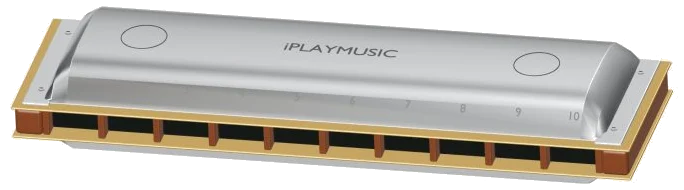
It’s a 10 hole diatonic harmonica in the key of C right there in your browser. It’s an online virtual harmonica. No plugin, account, or microphone is required. Just use your computer keyboard, mouse or fingers if you’re using a tablet or phone.
The sound comes from actual recorded harmonicas and the visual is a rotating and zoomable 3D model. Every note plays with one touch; no blowing necessary. There is no dedicated sound button. Tap on a note to play. The words Tap a note to play appear in the status line at the bottom of the page. When you tap a note, the recorded sounds will be prepared and the words Sound ready will appear.
How to Use the Virtual Harmonica
The question mark at the top opens the sound credits and help, while the Full screen button displays the harmonica on your entire screen. Press Esc or click Exit full screen to return to the page. The Volume slider is located in the bottom bar.
The layout uses traditional C Richter tuning with two rows of ten blow and draw reeds that is always visible, and each hole has both. The upper row (BLOW) according to the guide is for blowing, and the lower (DRAW) is for drawing. From hole one to ten the BLOW row would be: C4, E4, G4, C5, E5, G5, C6, E6, G6, and C7 while the DRAW row is D4, G4, B4, D5, F5, A5, B5, D6, F6, and A6. Each pad also displays the keyboard key, hole number, and note.
You don’t need to hold down a direction button because you can simply click on whichever row you choose. For example, BLOW · hole 4 · C5. Hold the blow note as you do when you play it, then release the pad to make it stop. Move around by sliding your mouse or finger across a row to jump from hole to hole. The line below the model indicates which note is being played.
If you’re using a computer keyboard, the blow notes of holes 1 to 10 is played by the number keys from 1 to 0 while the draw notes is played by the letter keys from Q to P. To hold the note down long, press the key. Space bar plays the last note you chose.
The harmonica rests in its own frame on the page. Click inside that frame first before trying to play from the keyboard. Blow → and Draw ← buttons play the current hole in either direction (and light up to show which direction you played last), allowing you to hear each pair of reeds from one hole side by side.
There’s also a G7 button that plays holes 2-5 as a draw, and a C chord button that plays holes 1-3 as a blow. These both sound for a moment, or continuously with Auto breath enabled. Auto breath turns on to allow continuous sound with no need for holding anything down. It maintains the selected reed and every time you tap another pad it will change pitch while continuing the breath. To halt the breath, tap Auto breath once more.
The Breath slider controls how hard you play: softer and mellow at lower settings; louder and brighter on a sounding note at higher settings. To play a melody, select one from the song menu: Ode to Joy, Twinkle, Twinkle, Morning steps, or Blow / draw conversation that alternates between the two rows. Tap Play song to play it. To pause, tap the button again and it becomes Resume.
The square ■ button will silence everything. The button with the arrow going around in a circle (↻) will repeat the song over and over. The Tempo slider goes from 50 to 150. Above the pads is a strip that shows you each note and its duration. Tap on a note in the strip to listen to it.
Click Game if you want to learn the song yourself. It will label the strips NEXT and NOW, along with the pads you need to press, which turn from amber to green. A counter tracks how far through you are. Each time you get it right, you move on straight away (including repeats) and can go as fast or slow as you like. If you hit another note, it tells you which green note to try. Once you finish it, it says Complete!
Click 3D · Rotate to look around the harmonica. Zoom in/out with your mouse wheel or pinch with two fingers on a touchscreen. Turn the background by dragging. Touch the 3D model’s holes and they will make a sound. The direction of the note for those 3D touches is determined by the last row you played. If you wish for the model to play draw notes, try playing a draw pad first. Use ↺ to reset the camera.
The help says that recordings are based off native sustain loops from FluidR3 by Frank Wen and other contributors (MIT license) and MuseScore General 0.2.1 (MIT). It is mapped to both directions. Live microphone breath sensing as well as bends and overblows are not recorded. You can find full details about recordings, sources, and licenses in the help window.
If you are using the online harmonica, start from the center. Blow on hole 4, then draw on hole 4. Listen to those two notes, they’re pretty close together. Next, select Twinkle, Twinkle. Press Play song once. Follow along in Game mode by following the green pads. You should of tried the other songs too. Actually, it’s moddern and luxurius.