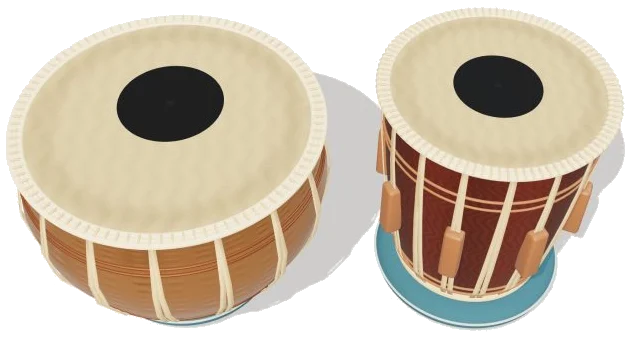
This is a virtual tabla. Bringing the famous pair of Indian hand drums into your browser, this online virtual tabla has both drums as 3D models that you can zoom in and out of, turn around, and tap away at. Each stroke sound like it’s coming from an actual recording of tablas being played. There’s no need to sign up or download anything, just play along using your mouse or your computer keyboard (or even your finger if playing on a tablet or phone).
It’s played as a pair of tablas. One is called the dayan, which produces the higher, ringing treble sounds. The other is the larger drum, the bayan, which produces the deep bass sound. As you play you learn the bols (spoken names given to each stroke), and the widget display the name of the last stroke played between the two drum.
How to Play the Virtual Tabla
To play you just tap one of these: a rhythm beat, a stroke pad or the heads of each drum. The sound activates with your first tap. For example, on the dayan it’s rim (Na), centre (Tun) and ring (Tin); and on the bayan it’s rim (Ke) and head (Ge). Below the drums are the stroke pads which include the two-drum strokes (Dha & Dhin), the light Re, the dry Ta and the closed Te.
On the drums, there are compound strokes called Dha and Dhin which combine both drums: Dha is Ge plus Na; Dhin is Ge plus Tin. As in playing a tabla, you can hit the pads of both drums simultaneously with two fingers or simply tap them. On a bass or compound pad, or on the head of the bayan, you can hold a bass stroke then bend the pitch of it by dragging sideways for the classic bass swoop.
The keys are played as follows: the right hand plays the treble side of a computer keyboard and the left hand plays the bass side. The closed bass stroke is S and the open bass stroke is A; J, K, L and; (the semicolon key) play Na, Tin, Tun and Te; D and F play Dha and Dhin. Dha is also played on the space bar. Re is H and Ta is G. To stop everything press escape. Note that the tabla is positioned in its own frame on the page so you must first click inside this before using the keyboard.
At the top is the rhythm menu which presents three taals (repeating rhythm cycles of Indian music): 6-beat Dadra; 8-beat Keharwa; 16-beat Teentaal. Tap Listen and the online virtual tabla will play the cycle with the beats lighting up in the Rhythm row. The filled dot represents sam, the first beat of the cycle, and the hollow dot represents khali. Tap on any beat to hear it alone. Change the tempo from 40-200BPM and play along yourself. Tap Stop to silence everything. These are simple practice versions of each taal and phrasing and bols can vary between traditions.
Learn at your pace with Game mode. Hit the marked zone, or hit the highlighted beat or tap the green stroke pad on the drum. The next different stroke is shown in advance (amber), and PLAY ×2 indicates two separate strokes before continuing. Use the compound pad or strike both marked zones for Dhin and Dha, with the guide showing what remains to be played. If you make a wrong stroke, you stay put. Press PAUSE to save, and restart gets you going again. Listen lets you hear the rhythm first, so you can learn how it sounds.
There are three sound options: Volume, Room, and Tuning. Room creates a sense of space surrounding the sound, while Tuning raises or lowers the pitch of the drums by as much as four steps up or down from their natural tone. Esc returns you to the page. The Fullscreen button brings the tabla into full-screen mode. Rotate 3D to explore the drums (heads remain playable at all times). To rotate, drag the drum shells or surrounding space, and to zoom, begin pinching away from the heads. Dragging on a head will bend or play it. Return to the front playing angle by tapping Reset view.
These sounds come from the free Sonic Pi project where Dio_333 has shared 16 real recordings of tablas. There’s more than one take for several strokes. Ge, Ke, Tun, and Te alternate on each stroke, making repeated ones sound naturaly. Dha and Dhin are created by combining a bass recording with a treble recording. Pitch bending and touch zones mimic real hand techniques.
For beginners, begin slowly with Keharwa. Just listen through once before tapping out the rhythm as it happens until you feel comfortabley with the pattern. Then, attempt it in Game mode, move on to Dadra, and finally, if time allows, the longer Teentaal cycle.