This is a 6/8 time metronome built specifically for online practice. A compound meter, it feels as if there are two big beats in each bar different than three.
To operate simply click on the buttons on the screen. Alternatively, press the regular keys on your computer keyboard. It’s an interactive way of helping you learn the distinctive feel of jig time, barcarolles, and other pieces. It allows you to recieve audio and visual feedback that holds you steady when you’re practicing a piece from scratch or perfecting your timing.
How to Use the 6/8 Metronome
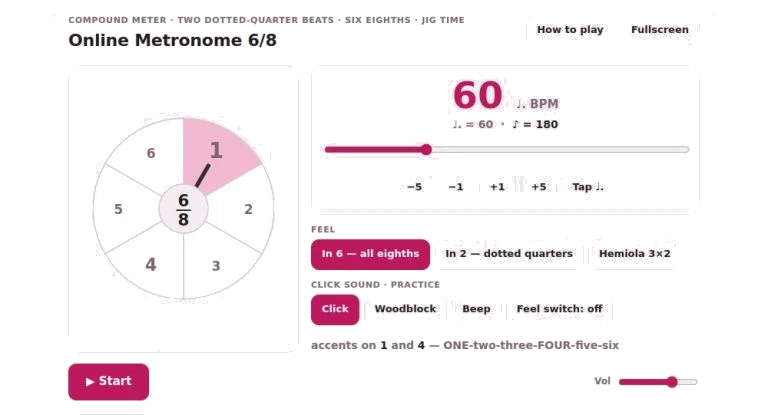
To begin, establish your tempo with the plus and minus buttons, or the large slider. They measures dotted-quarter beats per minute. It’s how 6/8 music usually counts out. Next to it, you’ll notice the equivalent eighth-note number. That way, you’ll always have an idea how quickly the individual click are going.
For those who don’t care to rely on slider, there’s the tap button. Tap the beat you’d like to move to. The widget will then calculate the tempo for you. It’s handy if you’ve got a melody stuck in your head. You want to count exactly as fast than that does. You won’t have to guess numbers.
To get started with your chosen tempo simply use the start button and away you go. If you wish, you can also use the space bar on your keyboard to start and stop metronome at any time.
While the metronome is running the visual wheel in the centre rotates showing you exactly where you are in the bar. There is always a stronger accent on beat one. A secondary accent fall on beat four. All six eighth notes pass under the hand on the wheel, helping you hear the flow of the music even if it’s just the main beats you are hearing.
What about the feel? For this, there are several options. Depending on what type of feel you desire, you can choose between clicking every eighth note, clicking only beats one and four, or using a hemiola mode that accents beats one, three, and five.
The “in six” setting produces one click per eighth note, which is great for practicing slowly and getting used to hearing those subdivisions cleanly. The “on two” setting produces only the first and fourth beats, giving you a more authentic feel for playing a fast jig without the clutter of all subdivisions. There is even a hemiola option that will make it so you’re accenting beats 1,3 and 5 which results in a three-against-two cross-rhythm often found in advanced pieces.
To get between the various options simply press the m key on your keyboard or use the buttons to cycle through them.
Make practice more effective by turning on the feel switch. This alternates between two bars of in six clicks and two bars of in two clicks. When the subdivisions turns off it forces your brain to keep the pulse going. There is a bar counter so you know what feel is on, no confusion. It’s a great tool for testing yourself if you really get the meter or not. And whether or not you are simply following along with the clicks blindfolded. You should of also count out loud to keep your internal clock steady during the transition.
You can adjust the sound of the clicks to fit your taste. By default, the click is clear and sharp. You also have the option to go with a beep that is more digital in sound or even a woodblock tone which will be a softer attack. When you do make changes to the sound, a short clip play back so you can hear it before hitting play again.
At the lower right-hand side, there is a slider where you can set the master volume. If the clicks is too quiet or too loud for your space, do this.
Settings can be changed with keyboard shortcuts, keeping your hand near the mouse and your other hand still on your instrument. To alter the tempo, press the up and down arrow keys to move the tempo in increments of one beat per minute. Left and right arrows will jump the tempo by five. For bigger changes that’s quicker. Tap the tempo with the t key. Toggle the practice feel switch on/off with the p key.
If you need more screen space, click the fullscreen button, which will enlarge the widget and make the visual cues easier to see.
Experiment with the various tempos and modes. Play a simple scale in two and listen to it. Notice the broader pulse. In six? Now hear how the notes slot into the sub-divisions. Use the feel switch to challenge yourself. See if you can continue to count fluidly when the clicks turns off.
This metronome is designed to help you develop an understanding of compound meter’s flow and swing. Use it as frequently as necessary until you are comfortabley with your timing.