This is an online virtual omnichord for playing an electronic chord instrument in your browser. It has a touch-sensitive strumplate that you can play. Choose from 27 different chords: major, minor, seventh. Sweep your finger across the strumplate. That pluck the notes of the chosen chord over four octaves.
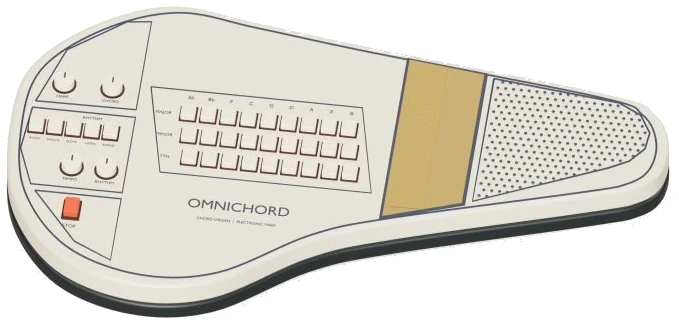
The omnichord on screen is a detailed 3D model, complete with knobs, rhythm buttons, strumplate and chord keys. Zoom into it, rotate it around as you play. Everything work. The sound is generated by electronic synthesis in the browser. No recordings are involved.
How to Use the Virtual Omnichord
Play it using your computer keyboard, your fingers on a tablet or phone, or even with a mouse. Nothing needs to be installed or downloaded. There is no sound button. Simply select your first chord and sweep the plate, it will switch the sound on. Then it says Sound ready.
Click the question mark at the top and it shows the sound credits and a brief guide. The Full screen button makes the omnichord fill your entire screen. Press Esc or click Exit full screen to get back to the page.
The bottom bar has a volume slider. Three rows of chords is labeled MAJ, MIN and 7TH. There are nine keys per row. The keys are: E♭, B♭, F, C, G, D, A, E, and B. On the minor row you get E♭m to Bm. On the seventh row you get E♭7 to B7.
Tap on a chord and it will play as a smooth organ-style chord. Its name appear in large letters beside the controls and in the 3D view. If Chord hold on is selected (the default setting), the chord continues to sound. It sounds until you select another one. Turn it off and each chord plays only briefly.
The Strumplate is the long strip below the chords marked sweep to strum →. Sweep your mouse, or a finger over it. As an electronic harp, it plucks the notes in the chord, but the sound fades away. From left to right the notes is low to high. That spans four octaves. You can also tap individual points on the plate. The note you’ve just plucked will be shown on the display along with the chord.
Use one hand to pick out chords and the other to sweep the plate. That enable you to accompany yourself. The major chords are selected using the number keys (1-9) on the computer keyboard. These correspond to the numbers on the board. Number 1 is E♭; number 4 is C; number 9 is B. Hold down Shift and the number to select the minor chord. For the seventh chord use Alt. Strum the chord by pressing the Space bar.
The omnichord is framed separately on the page. Play from the keyboard after clicking inside it once. To get the strumplate to do its own thing, simply click Auto arp. This will activate a rolling up and down pattern in time with the tempo. Changing the harmony is as simple as tapping out another chord. You would of needed it to stop playing.
For rhythm, there’s an original drum pattern added. The options here are Swing, Latin, Slow rock, Waltz and Rock. Turn on both Auto arp and Rhythm to have the omnichord accompany you. It means that the omnichord continues to accompany you as you play. You can even alter the chords while it plays.
Below these three sliders: Harp, Chord and Rhythm. These control the volume of the strumplate, the held chords and the drums respectively. Adjust as desired.
Open the progression menu: For songs, select one of these options: Four-chord sunrise, Minor evening, or Seventh swing. Tap ▶ Play song. The omnichord plays the chords. The rhythm switches on and the strumplate rolls. The button turns into Ⅱ Pause followed by ▶ Resume. To stop everything at once, use the ■ button.
The Tempo slider is set between 60 and 150. It begins at 100. Above the chord board, there’s a strip that shows the upcoming chords. Tap a chord in this strip to play it. Click ◇ Game to try it for yourself. Now the key of the chords you need lights up, green. Amber indicates the next one. They are marked as NEXT and NOW on the strip. Pressing the correct chord advances the game each time. Once you get to the end, the status line says: Game complete.
A good starting point is four-chord sunrise. This has just four chords: C, G, Am and F. It’s a complete playable 3D model. You can select chords by clicking their chord keys. Strum along by dragging on the bronze strumplate. Use the red STOP rocker to stop it all. Hit the rhythm buttons for Swing, Latin, Slow, Waltz or Rock. Drums begins immediately.
Turn each knob up a step with every click. Knobs are HARP, CHORD, TEMPO and RHYTHM. They wrap back around at the top. Sliders on the page follow suit.
Click 3D, then drag to rotate around the virtual omnichord. Drag the background to rotate it. Scroll to zoom. On touchscreens, use two fingers. The moddern controls continue to play even while you are looking around. Press ↺ to return to the starting view. Switching Rotate off does the same thing.
This is an original virtual instrument inspired by the OM-27 control layout. It features synthesized chord-organ and decaying electronic harp tones. It is not an official hardware emulator.
This is a guide. Press 4 for C if this is your first time playing an omnichord. Slowly sweep across the strumplate. You will now hear the chord across a range of four octaves. Next, switch on Rhythm with the Rock pattern. Turn on Auto arp. Change keys from C, G, Am, and F.