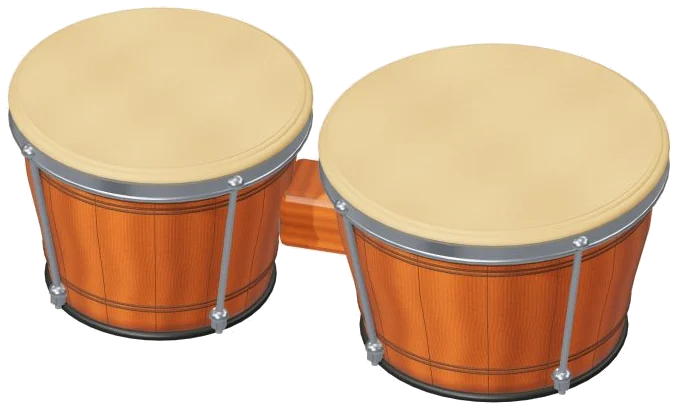
You get a pair of bongo drums direct to your browser. These online virtual bongos place a pair of bongo drums directy into your browser. Zoom and turn the drum on screen. It’s a 3D model. Each stroke are played back using real recordings. No synthesizers here, just genuine drum.
Play them with your mouse. Or play them with your fingers if you’re on a tablet or phone. Or play them with your computer keyboard. Nothing to install, nothing to download.
How to Use the Online Virtual Bongos
To get started, click on the widget and tap Enable sound (top). Once the drums are enabled, you will see Sound on as the button label. You can also start the sound by tapping on the stroke. Tap on the question mark beside the Enable sound button for a brief help page and credits. The ⛶ button toggles the bongos into full screen mode. To exit full screen, just tap on the same button.
Macho + hembra is written on the tag over the drums. Below that is the clue to it all: Tap the rim or tap the center. Tap near the edge for a muted stroke. Tap closer to the middle for a ringing, open tone. The stroke’s name shows up in the lower corner of the stage. When you hit an open stroke, the drumhead glows and bounces. Several finger can play at once. If you drag your finger across the drums, it will play a new stroke every time you get to a new spot.
The strokes is a row under the drums with four big pads that sound just like the drums. These are High · open, High · mute, Low · open, and Low · mute. If the 3D model doesn’t load on your device, then the pads will still play everything. A is the high drum played open on the keyboard. S is the high drum played muted on the keyboard. K is the low drum played open on the keyboard. L is the low drum played muted on the keyboard. Each of the pads has a key to show where it belongs.
The bongos have their frame on the page too. You can begin to play straight from the keyboard but first click inside the widget. Tap the Tap button above the pads and it plays the last stroke you selected. Hold down the Space bar and it repeats the stroke as a roll. Pressing the Roll button maintains the roll even when no key is held. While the button is engaged, tapping another stroke changes the roll to play that instead. Use the Speed slider to set the speed of a repeating roll. It ranges from 3 to 14 hits per second. Initial setting is 7. Click the ■ Stop button (or press the Esc key) to silence everything at once.
The touch slider is 20-100 percent. Begins at 64. Four strokes, each at one of three strengths. Harder or softer are Touch choices. It also determines how loud it’s played. Three presets appear below your sound. By default, this is set to Natural. Soft lightens the touch and adds more roominess, but it has a darker sound. Room plays firm and has a very large echo in it. The room slider next to these lets you manually add or remove the echo. Use the volume slider at the bottom of the widget to control the overall level.
On the PLAY A LITTLE menu, select a rhythm (one of four). Try the island walk, around the drums, easy conversation, or martillo steps. Tap on listen ▷ and the bongos will play the rhythm. As they do each stroke lights up. When it says ■ Stop, tap on it to end the rhythm early. The tempo slider is set at 100. Move it left or right to set it between 45-180. While learning the rhythm you can slow it right down.
When you’re ready, click Play along. The next stroke glows green on its pad. On the drums too, it’s marked in green. The panel says to play the green target at your pace. The boxes marked play now, THEN and AFTER show the upcoming strokes. They show the keys for the strokes. Your progress is tracked by a progress bar and counter. If you play the wrong stroke, the panel reminds you to follow the green target. As soon as you play the right one, the next stroke is ready. At the end, the panel tells you you’ve played it. It shows an Again button. Whenever you want to stop, click Play along again.
The ● Record button captures what you’re playing straight from the drums. You don’t need a microphone. When it says ■ Finish take, click it again. A Save take link appears where you can download your recording.
Click ↻ 3D view. Scroll or pinch to zoom. Turn the drums by dragging the background. Explore, and the drums will continue to play. You can switch back to the starting view using the ↺ button. The same process applies to turning off 3D view.
The recordings are from Versilian Studios LLC and the Versilian Community Sample Library. These are shared on a CC0-1.0 license. Drums: Both the low and high drums have open and muted strikes. There are three dynamics, each with two alternating takes. All sounds don’t repeat identicaly. Natural attack and decay is retained. They are 3D bongos.
If you’re new to the online virtual bongos, select the Natural preset. For an easy open beat, alternate between A and K on the high and low drum respectively. Next, pick Easy conversation. Click Listen. Select Play along with the Tempo lowered. Begin slowly. Maintain the pulse. Soon it will feel naturaly.