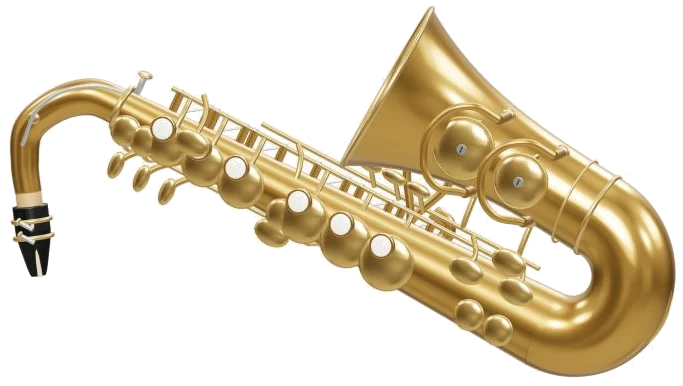
This online virtual instrument allows you to play an E♭ alto saxophone right now from your browser. It’s not a synthesiser but it actualy uses real recorded samples for its sound. There is no need to install anything as you can play with your computer keyboard, your fingers on a tablet or phone or even a mouse.
The saxophone itself is a 3D model of the actual instrument, including pearl keys that you can zoom and rotate on screen. The widget opens up with Ready · tap to enable sound in the status line at the bottom. Tap on a note; it says Preparing recorded sounds… and then Sound ready. The Full screen ⛶ button makes the sax fill the entire screen. The question mark opens the credits and help. You can exit full screen by clicking that button again or pressing Esc to go back to the page.
How to Use the Online Alto Saxophone
There are 25 notes, covering each semitone from written C4 to C6, with the flats and sharps in a slightly different shade. You play by pressing and holding a pad and let go to stop. The notes is written in treble clef, so the sound is lower then the name on the pad. For instance, when you play the written C4 on the alto, it sounds like E♭3 on the stage. The guide explains that you hold a note to breathe. Press and hold a pad to play, and release it to stop. The keyboard shortcuts for each pad is also displayed. The keys are played from bottom to top. They are A W S E D F T G Y H U J K, followed by Z X C V B N M, comma, period, slash, and the two square bracket keys. This takes you from C4 up to C5 and then continues to C6.
Use your finger to hold down a key for as long as you wish that note to sound, and press the Space bar to play the chosen note. The sax appears in its own frame on the page too, so first click within this frame before playing with the keyboard.
To get you started learning the basics there’s a little fingering box beside the pads called main keys · L / R. This has six dots representing the main keys of the right and left hand, with dots to fill in the keys you’d play. Beneath are the note name, then a line that gives the additional key if present like B♭ bis key, G♯ key, E♭ key, Low C key etc., (or just Main keys) and finally an indication of which octave key is on/off. On the 3D model, these keys pushes down accordingly. As it says in the help this is a beginners guide to common fingerings.
Auto breath button begins in the off position (Auto breath: off). Switching this on means you can tap pads for different pitches but don’t have to hold down anything. Just keep the sax blowing the note you’ve chosen. Tapping the button again switches auto breath off. The guide will confirm that it’s now switched off.
The volume slider at the bottom controls overall level; the expression slider alters dynamic from soft to strong.
Four melodies make up the song menu. They are First five notes, Ode to Joy, Twinkle, Twinkle, and After-hours walk, an original blues exercise. Tap on the Play song button (▶) to listen. It becomes a Pause and Resume button (Ⅱ). There is also a Repeat loop button (↻) and a Stop button (■). While a song plays, tap another note and you’ll take over from the song.
You can choose the tempo with the Tempo slider. They’re all set to start at different tempos: 88 for First five notes, 96 for Ode to Joy and Twinkle, Twinkle, and 104 for After-hours walk. The slider range is between 50 and 150. There’s a treble-clef staff for every song, too, with all of the notes named out below and the key and 4/4 time signature written above. Tap on any note on the score and you’ll hear it played back. While playing the game or during a song, the score will turn the page automatically, with the current note highlighted in green and the next in amber. You can also manually page through the score using the ‹ and › buttons.
Click ◇ Game to learn a melody step by step. The guide shows the note to play, the next note, and a counter. The pad you need now turns green, and the next one is previewed in amber. If you tap correctly, you’re advanced immediately; if not, the guide tells you what to try. Finish and it says Phrase complete! Play again or pick another melody. Click Game again to exit at any time.
In both views, you can play the 3D model. Touching the body will play the chosen note, or tapping one of the pearl keys acts as a shortcut for that note. Pressing the octave key on the model will play an octave above the chosen note. Click 3D · Rotate, then you can rotate the 3D model by dragging the background. Zoom with two fingers or by scrolling the mouse wheel. You can continue to rotate the instrument while it remains playable. Use the ↺ button to reset the camera.
The online virtual alto saxophone is based off the MuseScore General SoundFont (version 0.2.1). This soundfont is “based on Frank Wen’s FluidR3 recordings” and is licensed under the MIT license. It contains a set of 15 recorded notes with sustain loops plus a release envelope. It doesn’t copy each acoustic articulation, nor does it measure your breath; it simply models volume and pitch as the help page explains. The Beethoven melody and traditional melodies are in the public domain, while the 3D model and practice arrangements were created for use by iPlayMusic.
For anyone unfamiliar with this online virtual alto saxophone, select the option called First five notes and simply tap your way through the score listening to each note in turn. Next, begin playing the game. Watch carefully as the 3D keys and the finger box light up when a green pad is pressed.
The sax looks very luxurius. You should of used the settings to change the sound. Most people find the interface very comfortabley to use. The moddern design is great. I didnt recieve any issues. It is better different than the old version.