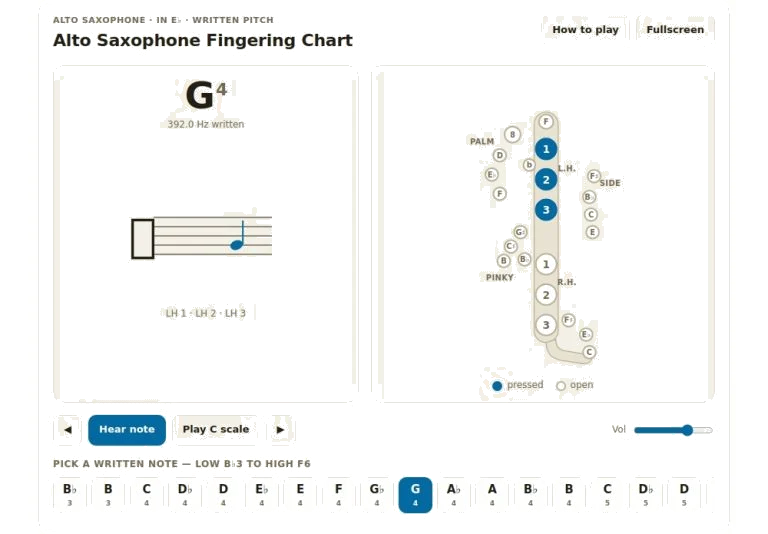
Below is an interactive chart that lets you not only see but also hear all notes on the alto saxophone. Simply navigate instrument with your trackpad or mouse. Alternatively, if you prefer to work more quickly, you can plays the notes on your computer keyboard. This is great for exploring range of the instrument, practicing intonation, or checking fingerings. You can do this all without having to purchase a single piece of equipment.
A diagram of the saxophone keys are central to the interface. Circles that is filled indicate what keys you need to play the chosen note. Those with empty outlines indicate keys you want open. One, two and three is labels for the main touchpieces of your left-hand. Right-hand keys are labelled likewise: one, two and three. Eight is the label for the octave key operated by your left thumb. Side keys is smaller and relate to extra controls such as palm keys.
How to Use the Saxophone Chart
Clicking on buttons in the row beneath the diagram plays corresponding note. You could alternatively click directly on larger note name in the middle panel. It navigates well with keyboard shortcuts or using a pointing device. To move around, use the left/right arrow keys which will moves you through the range one semitone at a time. That takes you through the full range of what’s written out, starting with low B-flat three, going all the way up to high F six.
To hear the note again that’s been selected, simply hit the spacebar. For some of the notes, there is alternative fingerings that you may wish to try. Just tap the A key and it switches between alternate and primary fingering. When more than one option are valid for higher notes, you can compare them side by side. The arrow buttons beside the play button can be tapped too, to play through the notes in sequence.
The Transport Bar lets you control your listening environment with these tools. The volume slider on the right controls the master output level so you can listen at a comfortabley volume for practicing or more closely hear what’s going on. Fullscreen expands the widget and hides other items on page. Click the fullscreen button to do that or press F to toggle between the two modes.
Play Scale: Click the play C scale button for an instant auditory exercise. It will trigger an automatic run-through of the first octave. This little trick help you internalize the sequence and the fingerings. Click the button again to stop earlier if desired.
To accurately practise you need to understand what the pitch means. To do this we have a chart that shows written notes. What this shows is that it’s the letter name of the note and not the actualy pitch that is sounded. So if you are playing an alto saxophone which has a range of E-flat then the note that you hear will be below the written one. The little graph that pops up shows exactly how many hertz of a frequency the note is. There is even a small stave graphic to show you where the note falls on staff. These ledger lines is for extreme registers.
Here are some handy hints that will increase output of your session. When learning notes in higher registers, use the alternate fingering toggle regularly. Depending off the musical situation, other fingerings may result in better intonation or tone quality. Mute your speakers and play through the chart on your actual instrument. This is a test of visual clues versus your physical memory of your fingers.
For those times when you need a reminder of basic operating rules and key abbreviations, the help panel offer a quick guide. It can be accessed by pressing the question mark key or its own dedicated button. Leave it up as you work through tricky sections of music. Explore the full range of the instrument. Pay attention to how the octave key activates evenly from written D five onward. This develop finger independence between registers.
Don’t expect to be fluent with all the fingerings during the first practice. You should of consider it as a method for strengthening those sections where you are unsure or struggling with the technique. Give it a try now; follow the visual cues and see what happens.