Directly in your browser, you can play online virtual wind chimes. There is no installation or download required.
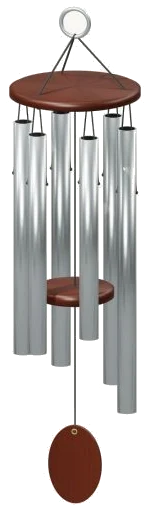
It’s an instrument made of six hollow tubes with a wooden clapper. Use your computer keyboard, your fingers on a touch screen, or even the mouse. The visual model is 3D and zoomable/rotatable. Sounds is real recordings, not a synthesizer.
How to Play the Virtual Wind Chimes
No start button here. Hit your tube once, hear the sound. See a message on the bottom that says it’s done recording. Tap the question mark icon for the credits and guide.
Below the chimes is all of the controls. There is six tubes that are tuned to C5, D5, E5, G5, A5 and C6. These are mirrored by a row of buttons. To play one, click on the button or the tube itself. When the tube is played it will light up and sway back and forth.
You can allow the notes to ring together. Each note are independent of the others. It sounds as if real chimes is moving through the air. The notes is displayed with the corresponding keyboard letter on each note button. Play the tubes from low to high using the letters A, W, S, E, D & F on the keyboard. The chimes sit on a separate frame of the page. Click inside the frame before pressing any keys.
You can see which notes/chords you’re playing on a bar beneath the chimes. This begins with C5. You can play these again by pressing the Space bar or the Play button. To stop the sound, press the Esc key or Stop button.
The Expression slider is set between 10 and 100. By default this is set to 70. This increases the volume of the strike. Click Wind on to play a random pattern for you. In the model, the clapper sways back and forth. You can also do this by holding down the Space bar.
The wind speed slider goes from 1 to 12. It begins at setting 5. A low setting is a slow breeze. A high setting is a busy gust. To stop the pattern, press Wind on or Stop.
Play together This is the row that strikes several tubes simultaneously. There are four buttons: Soft, Bright, Fifth, and Open. These are controlled by the number keys on the keyboard (1-4). Each button produce a ring of two or three tubes. This results in a more full sound compared than one note alone.
The overall tone can be changed using three presets. The default is set to naturaly. Soft takes some of the brightness off and adds a little more room. And resonant has quite a lot of reverb. These presets also change the Room slider automatically.
This slider begins at 12 and goes up to 50. To change the echo, you can move this slider manually. Below that on the right is the volume slider which control the overall level and begins at 80.
The PLAY A LITTLE offers to let you try out some of the patterns. There are three options: First steps, Call & answer or A little journey. Click Listen to hear the pattern. Then there’s a Tempo slider that let you change the speed. This goes from 40 to 180.
Click Game mode to play yourself. A green highlight guides the next note. On the model, the matching tube light up. Boxes marked PLAY NOW and NEXT show what is coming, each with its keyboard letter. There’s also a counter showing how far you have come. Play the right note and the game moves on. You can play as slowly or quicker as you like. When you have finished, it says Complete. You can listen back and then choose another pattern or play freestyle. Click Game mode again whenever you want to leave it.
Your playing will be recorded by clicking the Record button. No microphone required. Click again to stop recording. You’ll get a Save take link where you can download your file.
To rotate the chimes around, click Rotate 3D and drag the background to spin the model. Pinch or scroll to zoom in and out. You can continue playing with the tubes while they are rotating. Clicking on the Home button will reset it back to the starting position. To do the same thing without turning off Rotate 3D.
Play around. If this is your first time using wind chimes, begin here by playing each tube individually. Press the A-F keys to listen to each note gradually diminish. Activate Wind on at a slow setting. Choose the resonant preset. Sit back and let the chimes do their thing.